Deploy with Docker Compose
Run Little Origin on your own server with a single container. You need Docker 20.10+ with Compose v2 and ~1 GB of RAM.
Quick Start
Create a docker-compose.yml:
services:
  little-origin:
    image: ghcr.io/nightbr/little-origin:latest
    container_name: little-origin
    restart: unless-stopped
    environment:
      TZ: Europe/Paris
      NODE_ENV: production
      PORT: 3000
      SERVE_STATIC: "true"
      DATABASE_URL: file:/.data/little-origin.db
      # REQUIRED - change this!
      JWT_SECRET: change_me_to_secure_random_string
    volumes:
      - little-origin_data:/.data
    ports:
      - "3000:3000"
    healthcheck:
      test: ["CMD", "wget", "--no-verbose", "--tries=1", "--spider", "http://localhost:3000/health"]
      interval: 30s
      timeout: 10s
      retries: 3
      start_period: 40s

volumes:
  little-origin_data:
    driver: local
Generate a secure JWT_SECRET with openssl rand -base64 32. All environment variables are documented in Configuration.
Start it:
docker compose up -d
The database is created and migrated automatically. Open http://localhost:3000 — you're in.
First-Run Setup
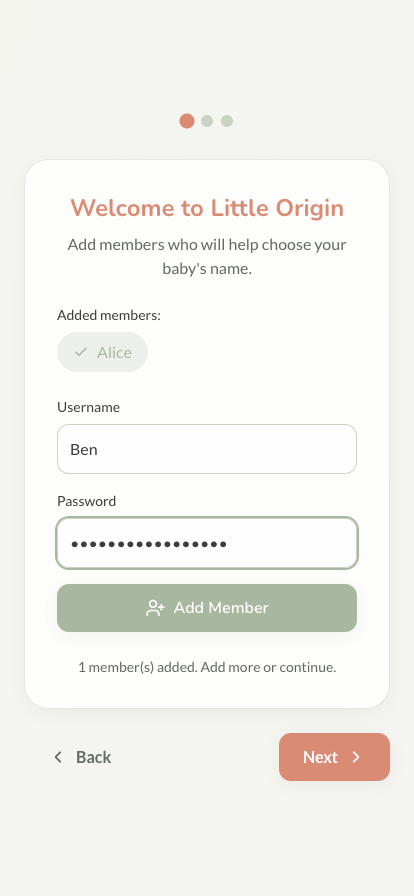
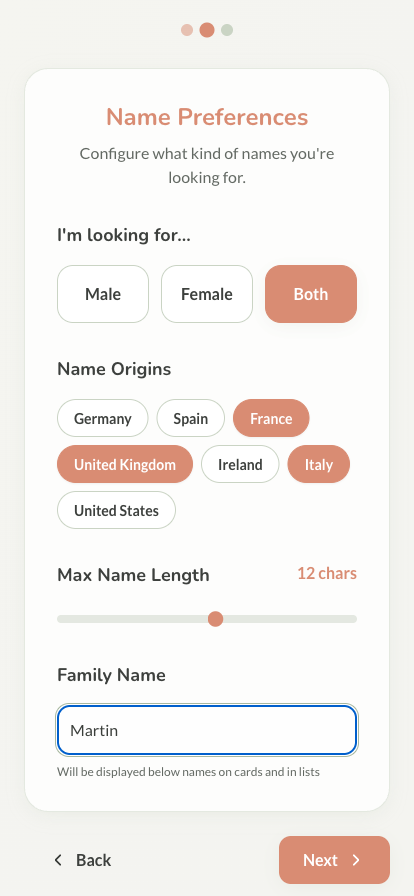
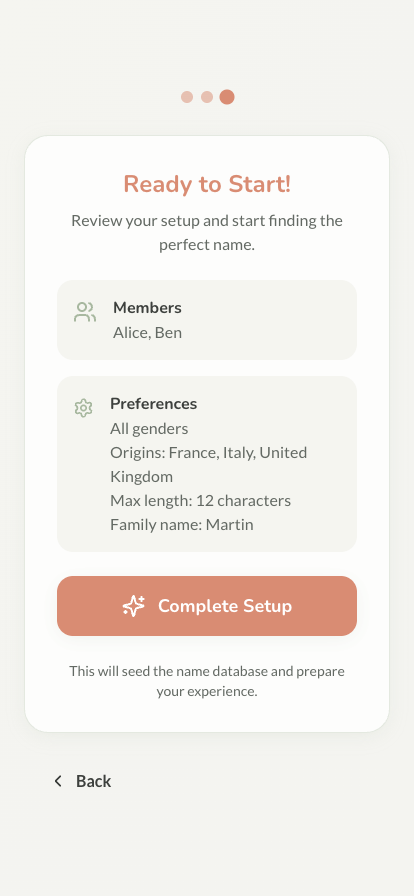
A guided onboarding walks you through creating member accounts, setting name preferences, and seeding the name database:
HTTPS with Traefik
For production, run behind a reverse proxy with automatic HTTPS:
services:
  little-origin:
    image: ghcr.io/nightbr/little-origin:latest
    container_name: little-origin
    restart: unless-stopped
    environment:
      TZ: Europe/Paris
      NODE_ENV: production
      PORT: 3000
      SERVE_STATIC: "true"
      DATABASE_URL: file:/.data/little-origin.db
      JWT_SECRET: change_me_to_secure_random_string
    volumes:
      - little-origin_data:/.data
    networks:
      - reverseproxy
    labels:
      - "traefik.enable=true"
      - "traefik.http.routers.little-origin.rule=Host(`little-origin.example.com`)"
      - "traefik.http.routers.little-origin.entrypoints=websecure"
      - "traefik.http.routers.little-origin.tls.certresolver=letsencrypt"
      - "traefik.http.services.little-origin.loadbalancer.server.port=3000"
      # Optional: automatic updates via Watchtower
      - "com.centurylinklabs.watchtower.enable=true"
    healthcheck:
      test: ["CMD", "wget", "--no-verbose", "--tries=1", "--spider", "http://localhost:3000/health"]
      interval: 30s
      timeout: 10s
      retries: 3
      start_period: 40s

volumes:
  little-origin_data:
    driver: local

networks:
  reverseproxy:
    external: true
Replace little-origin.example.com with your domain; the reverseproxy network must exist in your Traefik setup.
Prefer nginx? Proxy your domain to localhost:3000 (make sure to forward the Upgrade/Connection headers — the app uses WebSockets), then sudo certbot --nginx -d your-domain.com.
Backups
Everything lives in one SQLite file. Back up the volume regularly:
docker run --rm -v little-origin_data:/data -v $(pwd):/backup \
  alpine tar czf /backup/little-origin-backup-$(date +%Y%m%d).tar.gz /data
Updating
docker compose pull && docker compose up -d
See Updating for version pinning, rollbacks, and automatic updates.
Troubleshooting
Start with the logs: docker compose logs -f little-origin.
- Container won't start — port 3000 taken, insufficient memory, or volume permissions
- Health check failing — the container must reach
http://localhost:3000/health - Image pull fails — try
docker pull ghcr.io/nightbr/little-origin:latestdirectly - Database errors —
docker compose down -v && docker compose up -dresets everything ⚠️ deletes all data
Build from Source
Replace image: with a build context to customize the code:
services:
  little-origin:
    build: .
    # ... same configuration as above
git clone https://github.com/Nightbr/little-origin.git && cd little-origin
docker compose up -d --build
Uninstall
docker compose down -v   # ⚠️ deletes the database
docker rmi ghcr.io/nightbr/little-origin:latest
Next Steps
- Configuration - Environment variables, backups, tokens
- Updating - Keep your instance current
- Explore features - Start swiping